
Looking for the best AI video editing software in 2025? With the rise of automated video creation tools, choosing the right platform can be overwhelming. Whether you’re a content creator, marketer, or educator, finding a solution that balances quality, ease of use, and customization is key. In this in-depth review, we take a close look at HeyGen, one of the most talked-about tools in the space, to help you decide if it’s the right fit for your video production workflow.
Table of Contents
What is HeyGen? A Quick Overview of This AI Video Editing Software
HeyGen is an innovative AI video editing software that empowers users to create professional-quality videos without the need for cameras, actors, or extensive editing skills. By leveraging artificial intelligence, HeyGen transforms text inputs into engaging videos featuring realistic avatars and voiceovers, streamlining the video production process for businesses, educators, and content creators.
Key Features of HeyGen
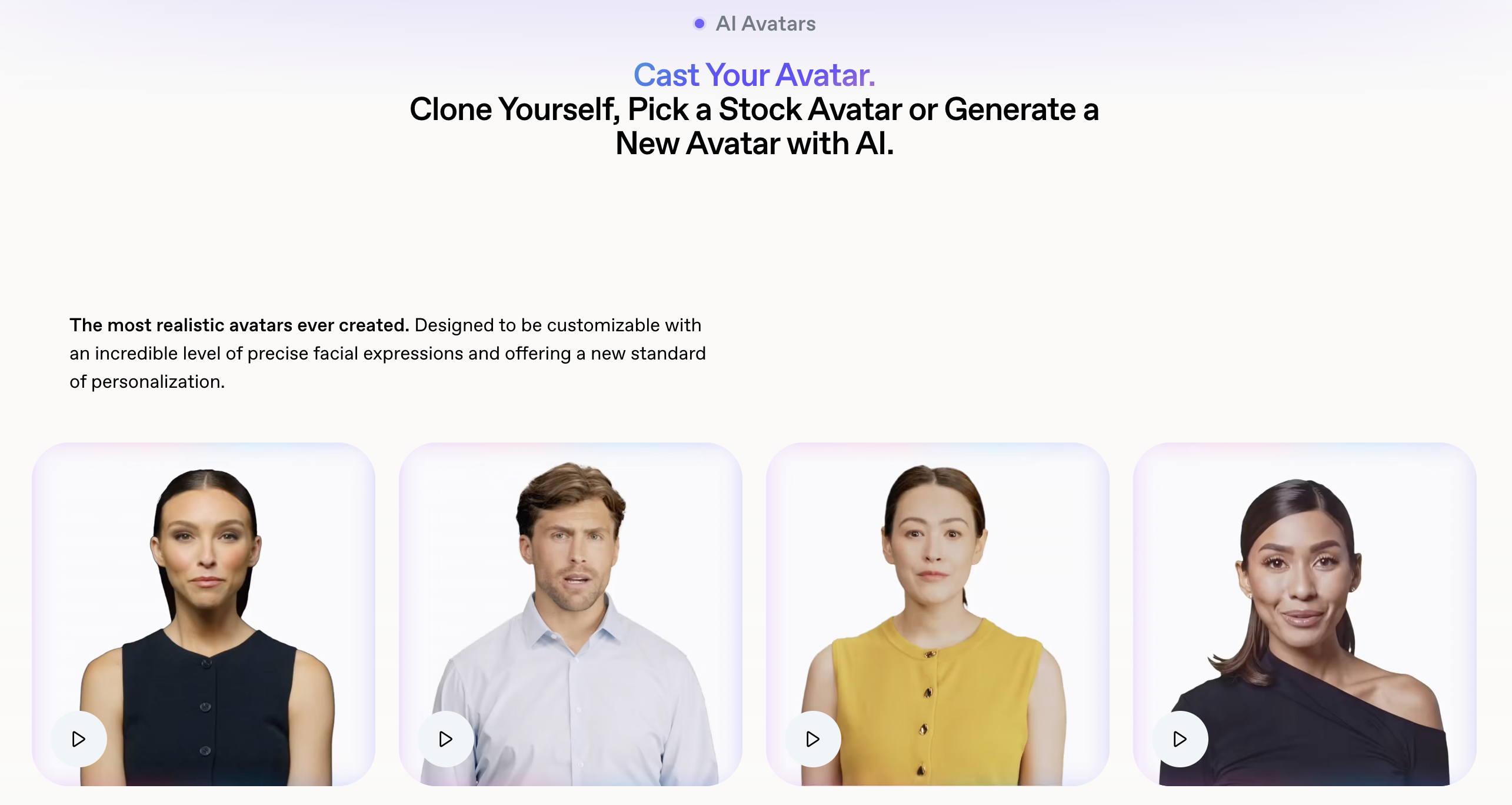
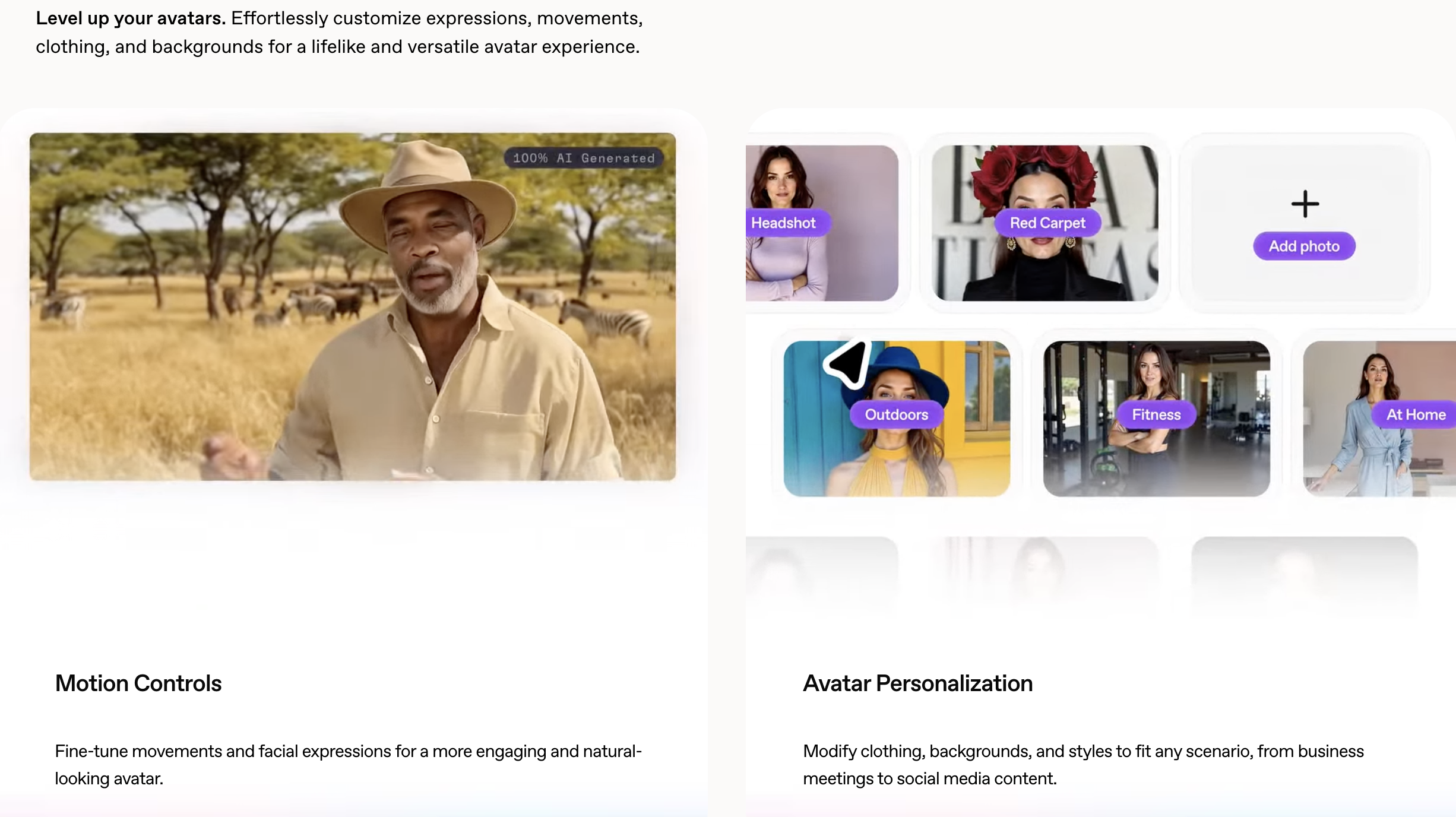
- AI Avatars: Choose from a diverse library of over 120 customizable avatars representing various ethnicities, ages, and styles. These avatars can deliver your script with natural facial expressions and lip-syncing, enhancing viewer engagement.
- Voice Cloning and Text-to-Speech: HeyGen offers AI-generated voiceovers in more than 40 languages, allowing for global reach. Users can also clone their own voices for a personalized touch.
- Script Generator: The built-in AI script generator assists in crafting compelling scripts tailored to your video’s purpose and audience.
- Templates and Customization: Access over 400 templates designed for various industries and use cases. Customize videos with your brand’s logos, colors, and backgrounds to maintain consistency.
- Multilingual Support: Produce videos in multiple languages with accurate translations and voiceovers, making it ideal for international audiences.
Use Cases for HeyGen
HeyGen’s versatility makes it suitable for a wide range of applications:
- Marketing and Sales: Create promotional videos that resonate with target audiences without the need for on-camera talent.
- Education and Training: Develop engaging e-learning content and training modules with consistent delivery.
- Corporate Communications: Produce internal communications and presentations efficiently, ensuring message consistency across teams.
- Social Media Content: Generate captivating content for platforms like YouTube, TikTok, and Instagram, enhancing brand visibility.
Advantages of Using HeyGen
- Time and Cost Efficiency: Reduce production time and expenses by eliminating the need for filming equipment and personnel.
- User-Friendly Interface: HeyGen’s intuitive platform allows users of all skill levels to create high-quality videos with ease.
- Scalability: Ideal for businesses looking to produce large volumes of content without compromising quality.
User Interface and Ease of Use in HeyGen (2025 Update)
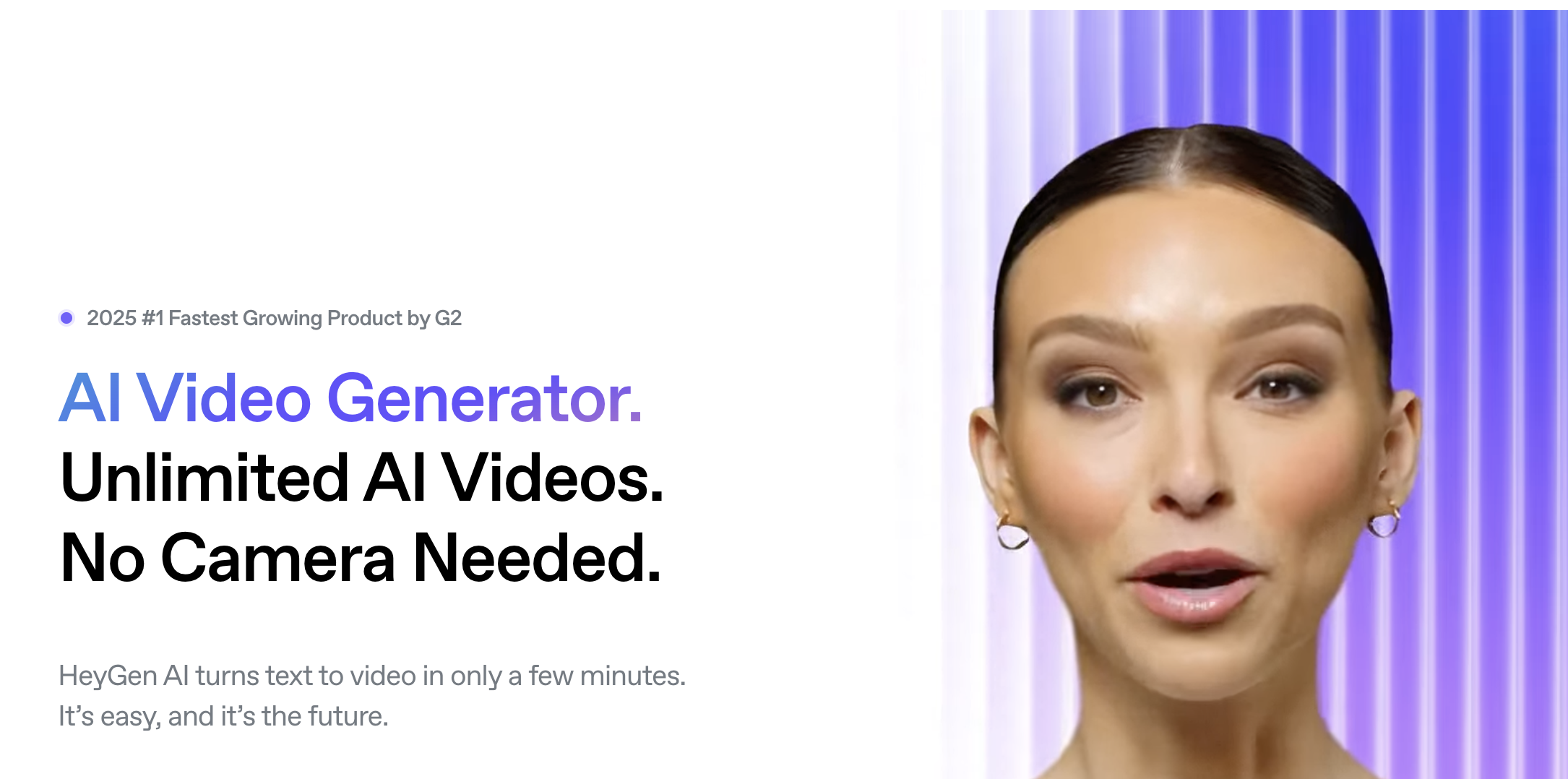
HeyGen continues to solidify its reputation as a leading AI video editing software in 2025, particularly due to its intuitive user interface and streamlined user experience. Designed to cater to both novices and seasoned professionals, HeyGen’s platform ensures that creating high-quality videos is both accessible and efficient.
Seamless Onboarding Experience
Upon signing up, users are greeted with a straightforward onboarding process. The platform offers guided tutorials and helpful tooltips, allowing new users to familiarize themselves with the features without feeling overwhelmed. This approach minimizes the learning curve, enabling users to start creating content almost immediately.
Intuitive Dashboard Layout
HeyGen’s dashboard is thoughtfully organized, with clearly labeled sections such as “Projects,” “Templates,” “Media Library,” and “Collaborations.” This logical arrangement ensures that users can easily navigate through the platform, accessing the tools and resources they need without unnecessary clicks or confusion.
Drag-and-Drop Functionality
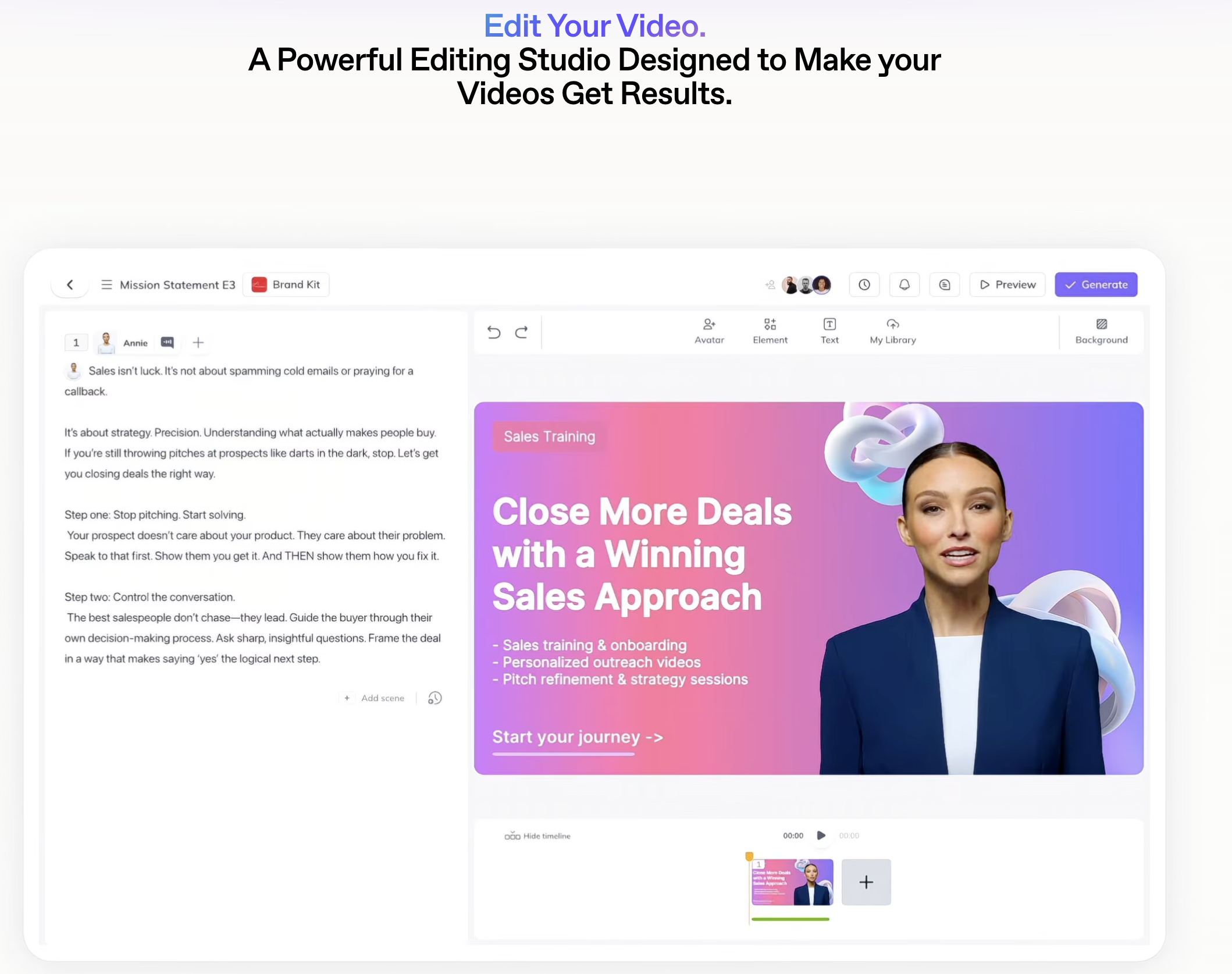
The platform’s drag-and-drop editor simplifies the video creation process. Users can effortlessly add elements like text, images, and avatars to their projects. This feature is particularly beneficial for those without prior video editing experience, as it eliminates the need for complex commands or procedures.
Real-Time Preview and Editing
HeyGen offers real-time previews, allowing users to see changes as they make them. This immediate feedback loop is invaluable, as it enables users to make adjustments on the fly, ensuring that the final product aligns with their vision.
Customizable Templates
To further enhance user convenience, HeyGen provides a vast array of customizable templates tailored for various industries and purposes. Whether creating a marketing video, educational content, or a corporate presentation, users can select a template that suits their needs and modify it to reflect their brand identity.
Responsive Design for Multiple Devices
Understanding the diverse needs of its user base, HeyGen’s platform is optimized for both desktop and mobile devices. This responsive design ensures that users can create and edit videos on the go, providing flexibility and convenience.
User Feedback and Continuous Improvement
HeyGen places a strong emphasis on user feedback, regularly updating its platform to address user suggestions and enhance functionality. This commitment to continuous improvement ensures that the platform remains user-centric and evolves to meet the changing needs of its audience.
Smart AI Features That Make HeyGen Stand Out
1. AI Avatars with Realistic Lip-Syncing
HeyGen provides access to over 300 AI avatars representing various ethnicities, ages, and styles. These avatars are designed to deliver scripts with natural facial expressions and precise lip-syncing, creating engaging and lifelike video content.
2. Text-to-Video Conversion
Transforming written scripts into professional videos is seamless with HeyGen’s text-to-video feature. Users can input their text, select an avatar and voice, and generate a video in minutes, eliminating the need for traditional filming equipment.
3. AI Voice Cloning
HeyGen’s voice cloning technology allows users to create a digital replica of their own voice. By recording a short audio sample, the platform can generate a personalized voice model, which can be used in videos to maintain brand consistency and authenticity.
4. Multilingual Support with Accurate Translation
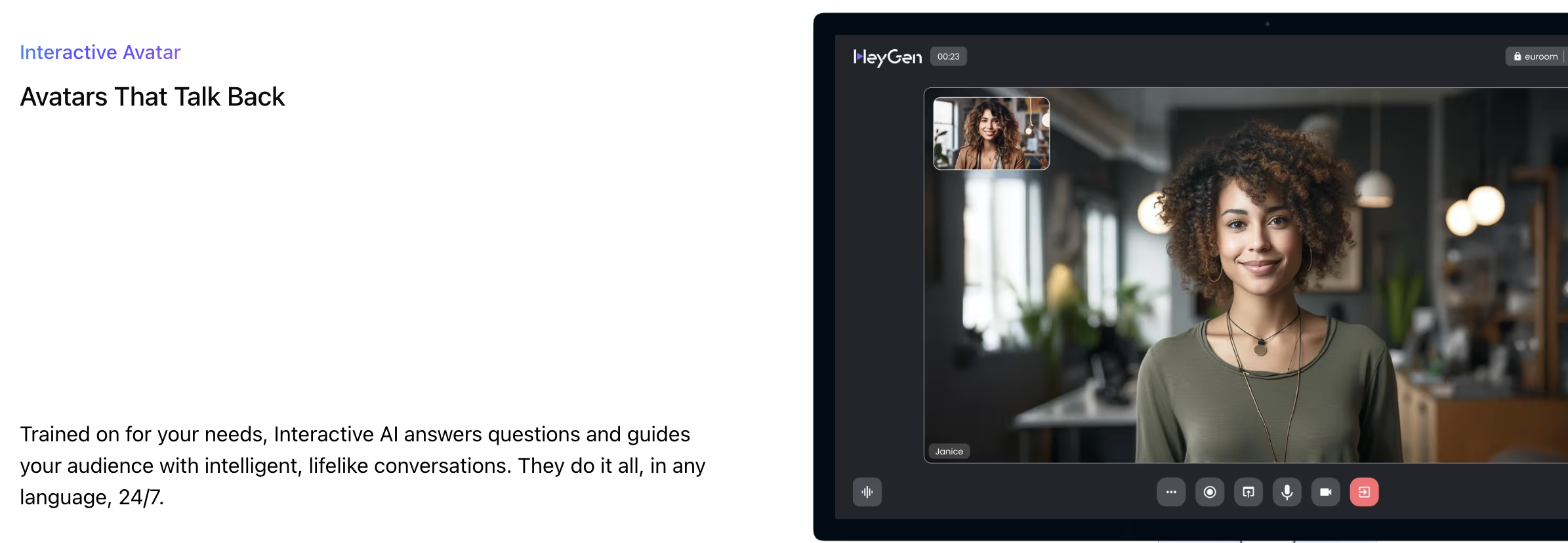
Catering to a global audience is simplified with HeyGen’s support for over 175 languages and accents. The platform can accurately translate scripts and synchronize the translated speech with the avatar’s lip movements, ensuring effective communication across different languages.
5. Talking Photo Feature
Beyond video avatars, HeyGen offers a “Talking Photo” feature that animates static images. By uploading a photo and inputting a script, users can create engaging content where the subject appears to speak, adding a dynamic element to presentations and social media posts.
Incorporating these smart AI features, HeyGen empowers users to produce high-quality, personalized video content efficiently. By leveraging advanced technologies like realistic avatars, voice cloning, and multilingual support, the platform addresses the evolving needs of modern content creation.
Templates and Customization Options in HeyGen
Extensive Template Library
HeyGen provides a diverse collection of templates designed for different purposes, including:
- Marketing and Sales: Templates for product promotions, advertisements, and customer testimonials.
- Education and Training: Templates suitable for e-learning modules, instructional videos, and onboarding materials.
- Corporate Communications: Templates for internal announcements, presentations, and company updates.
- Social Media Content: Templates optimized for platforms like YouTube, TikTok, and Instagram.
These templates come with pre-set layouts, animations, and transitions, allowing users to produce high-quality videos without starting from scratch.
Customization Features
HeyGen’s templates are fully customizable, enabling users to tailor videos to their specific needs:
- Text and Script Editing: Modify on-screen text and voiceover scripts directly within the template.
- Avatar Selection: Choose from a range of AI avatars to represent your brand or message.
- Background and Visuals: Alter backgrounds, images, and visual elements to match your branding.
- Music and Audio: Add or replace background music and sound effects to enhance engagement.
- Branding Elements: Incorporate logos, color schemes, and fonts to maintain brand consistency.
These customization options ensure that each video aligns with the user’s brand identity and communication goals.
Personalized Video Templates
For users looking to create personalized videos at scale, HeyGen offers the ability to design templates with dynamic placeholders. By integrating with tools like Google Sheets and Zapier, users can automate the creation of videos that include personalized elements such as names, company details, or other specific information.
API Integration for Automation
HeyGen’s API allows developers to generate videos from templates programmatically. This feature is particularly useful for businesses aiming to automate video production workflows, such as sending personalized video messages to customers or generating content for large-scale campaigns.
By leveraging HeyGen’s extensive template library and robust customization features, users can efficiently produce high-quality, branded videos tailored to their specific needs. Whether creating content for marketing, education, or internal communications, HeyGen’s AI video editing software streamlines the production process while offering the flexibility required for effective storytelling.
Video Quality and Export Options in This AI Video Editing Software
High-Definition Video Output
HeyGen supports multiple video resolutions, including standard HD (720p), Full HD (1080p), and 4K Ultra HD. While 720p and 1080p are available to all users, 4K exports are exclusive to Enterprise plan subscribers or Team plan users who subscribed before September 10, 2024, and have maintained continuous payments.
Export Formats and Compatibility
HeyGen allows users to export videos in various formats to suit different needs:
- MP4: Widely compatible with most devices and platforms.
- MOV: Preferred for high-quality video editing on Apple devices.
- WebM: Optimized for web use, offering efficient compression without significant quality loss.
These options ensure that videos can be seamlessly integrated into websites, social media platforms, or professional presentations.
Aspect Ratio and Platform Optimization
To cater to various platforms, HeyGen provides options to adjust the video’s aspect ratio:
- 16:9: Ideal for YouTube and desktop viewing.
- 9:16: Optimized for vertical platforms like TikTok and Instagram Reels.
- 1:1: Suitable for Instagram and Facebook posts.
This flexibility ensures that content is displayed correctly across different devices and platforms.
Export Process and User Experience
Exporting a video in HeyGen is straightforward:
- Finalize the Project: Ensure all edits and adjustments are complete.
- Select Export Settings: Choose the desired resolution, format, and aspect ratio.
- Initiate Export: Click the ‘Export’ button to begin the rendering process.
- Download: Once rendering is complete, download the video directly to your device.
Users can also share videos via direct links, embed codes, or by uploading directly to social media platforms.
Considerations for 4K Video Creation
For users aiming to produce 4K content:
- Source Material: Ensure that any uploaded footage or images are in 4K resolution.
- Avatar Quality: When creating custom avatars, use 4K video recordings to maintain consistency.
- Export Settings: Select the 4K option during the export process to achieve the highest quality output.
It’s important to note that 4K exports are only available to Enterprise users or qualifying Team plan subscribers.
By offering a variety of video quality settings and export options, HeyGen’s AI video editing software ensures that users can produce content tailored to their specific needs, whether for social media, corporate presentations, or high-definition broadcasts.
HeyGen Pricing Plans: Is It Worth the Cost in 2025?
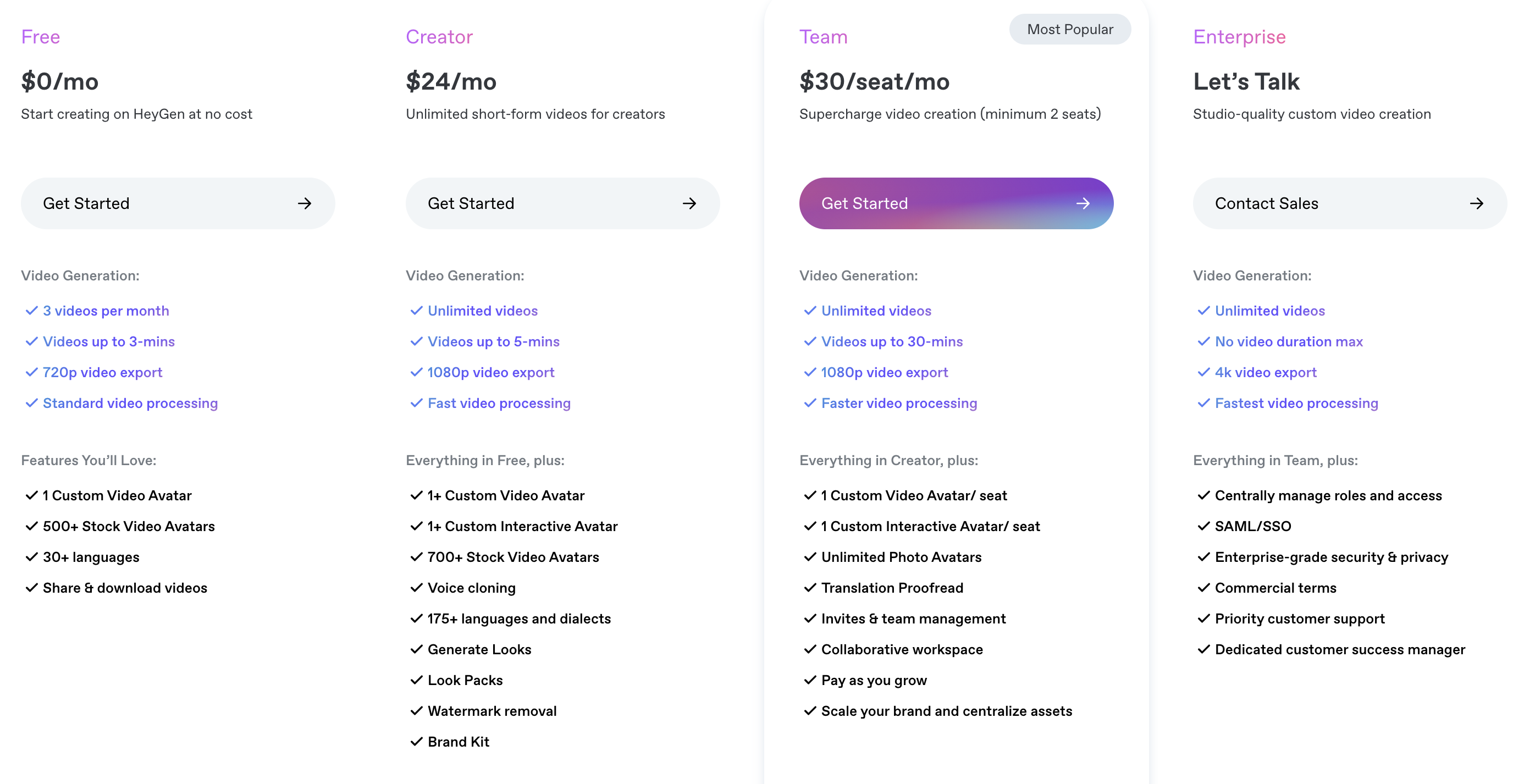
1. Free Plan – $0/month
Ideal for users who want to explore HeyGen’s basic features without any financial commitment.
Key Features:
- Create 3 videos per month
- Videos up to 3 minutes
- 1 Video Avatar
- Export up to 720p
- Standard video processing
2. Creator Plan – $24/month (billed annually) or $29/month (billed monthly)
Designed for individual creators producing short-form videos.
Key Features:
- Unlimited video creation
- Videos up to 5 minutes
- 1 Video Avatar
- 1 custom Interactive Avatar
- Export up to 1080p
- Brand Kit
- Custom Avatar Background removal
- Watermark removal
- Fast video processing
3. Team Plan – $30/month per seat (billed annually, 2-seat minimum) or $39/month per seat (billed monthly, 2-seat minimum)
Suitable for teams generating on-brand, high-quality videos.
Key Features:
- Unlimited video creation
- Videos up to 30 minutes
- 1 Video Avatar
- 1 custom Interactive Avatar
- Export up to 1080p
- Translation Proofread
- Multi-user workspace
- Brand Kit
- Watermark removal
- Custom Avatar Background removal
- Fast video processing
4. Enterprise Plan – Custom Pricing
Tailored for businesses with custom needs producing studio-quality videos.
Key Features:
- Unlimited video creation
- No video duration max
- 3+ Video Avatars; 3+ custom Interactive Avatars
- Export videos up to 4K quality
- Translation Proofread
- Brand Voice
- Enterprise security & privacy
- Priority Support
- Fastest video processing
API Plans
For developers and businesses looking to integrate HeyGen’s capabilities into their applications, API plans are available:
- Free API Plan: 10 credits/month, watermark included.
- Pro API Plan: $99/month for 100 credits, no watermark.
- Scale API Plan: $330/month for 660 credits, includes Video Translation API.
- Enterprise API Plan: Custom pricing with dedicated support.
Is HeyGen Worth the Cost in 2025?
HeyGen’s AI video editing software offers a range of plans to suit different user needs. The Free Plan is excellent for beginners exploring AI video creation. The Creator and Team Plans provide more advanced features for individual creators and collaborative teams, respectively. For large enterprises requiring extensive customization and support, the Enterprise Plan offers comprehensive solutions. Additionally, the API plans cater to developers and businesses looking to integrate HeyGen’s capabilities into their own platforms.
Considering the features and flexibility offered, HeyGen presents a valuable investment for those seeking efficient and high-quality AI video editing solutions in 2025.
Workflow and Integrations: How HeyGen Fits Into Your Stack
Seamless Integrations with Popular Platforms
HeyGen connects with numerous applications, allowing users to incorporate AI-generated videos into their existing workflows effortlessly. Key integrations include:
- Zapier: Automate tasks by connecting HeyGen with over 5,000 apps, enabling actions like generating videos from form submissions or sending notifications upon video completion.
- HubSpot: Transform blog posts into video summaries, enhancing content engagement and reach.
- Canva and Adobe Express: Convert static designs into dynamic videos, enriching visual storytelling without the need for extensive editing skills.
- ChatGPT: Leverage AI-generated text to create polished videos, streamlining content creation for various purposes like sales or training.
- Zoom: Utilize AI avatars in virtual meetings, maintaining a consistent presence without being physically present.
Automation and Workflow Optimization
HeyGen supports automation through platforms like Zapier, n8n, and Latenode, enabling users to:
- Trigger video creation based on specific events (e.g., form submissions, CRM updates).
- Distribute videos automatically across channels like email, social media, or cloud storage.
- Integrate with tools like Google Sheets, Slack, and Trello for streamlined project management.
Asset Management and Customization
HeyGen’s asset management system allows users to:
- Upload and organize images, videos, and audio files.
- Utilize features like FaceSwap and text-to-image to enhance video content.
- Record screens for tutorials or demonstrations directly within the platform.
API Access for Developers
For advanced customization, HeyGen offers API access, allowing developers to:
- Programmatically generate videos from templates.
- Integrate HeyGen’s capabilities into proprietary applications or platforms.
- Automate personalized video creation at scale.
By integrating HeyGen into your existing stack, you can enhance your content creation process, automate repetitive tasks, and deliver engaging AI-generated videos efficiently.
Performance and Rendering Speed: How Fast Is HeyGen?
Rendering Times by Plan
HeyGen’s rendering speed varies across its subscription tiers:
- Free Plan: Videos are processed after those from paid plans, with a standard wait time.
- Creator and Team Plans: These plans offer priority processing for the first 100 videos each month (per seat for Team plans). After exceeding this quota, videos may take anywhere between a few hours to up to 36 hours to complete.
- Enterprise Plan: Users benefit from full priority processing for all videos, ensuring the fastest turnaround times.
Factors Influencing Rendering Speed
Several elements can impact HeyGen’s rendering performance:
- Video Length: Longer videos require more processing time.
- Avatar Type: Utilizing custom avatars may extend rendering durations compared to standard avatars.
- Video Complexity: Incorporating multiple scenes, languages, or advanced features can increase processing time.
- Queue Status: During peak periods, especially on weekdays, rendering times may be longer due to higher demand.
User Experiences
Users have reported varying experiences with HeyGen’s rendering speeds:
- A two-minute video rendered in less than 10 minutes, showcasing the platform’s rapid turnaround.
- Most videos are processed within minutes, with higher-tier plans offering even faster speeds.
In summary, HeyGen’s AI video editing software offers competitive rendering speeds, particularly for users on higher-tier plans. By understanding the factors that influence processing times and selecting the appropriate subscription, users can optimize their video production workflow effectively.
Real-World Use Cases for HeyGen in 2025
1. Marketing and Advertising
HeyGen empowers marketing teams to produce engaging video content rapidly. By leveraging AI-generated avatars and voiceovers, marketers can create personalized video messages tailored to specific audiences, enhancing engagement and conversion rates. For instance, integrating HeyGen with platforms like HubSpot allows for automated and personalized video marketing at scale.
2. E-Learning and Training
Educational institutions and corporate training programs utilize HeyGen to develop instructional videos that are both informative and engaging. The platform’s AI avatars can deliver content in multiple languages, making it accessible to a diverse audience. This approach not only reduces production time but also enhances learner retention through consistent and interactive content delivery.
3. Customer Support and Onboarding
Businesses employ HeyGen to create onboarding videos and customer support tutorials that guide users through products or services. These videos, featuring AI avatars, provide a consistent and scalable solution for customer education, reducing the need for extensive human support.
4. Internal Communications
Companies leverage HeyGen to streamline internal communications by producing videos for announcements, policy updates, and team messages. This method ensures that information is conveyed consistently across the organization, fostering better understanding and alignment among employees.
5. Social Media Content Creation
Content creators and influencers use HeyGen to generate engaging videos for platforms like TikTok, Instagram, and YouTube. The ability to quickly produce high-quality videos with AI avatars allows for consistent posting and audience engagement without the need for extensive video production resources.
By integrating HeyGen into various workflows, users across industries can enhance their video content strategy, improve communication efficiency, and engage their target audiences more effectively.
Customer Support and Community Behind the Software
Comprehensive Customer Support
HeyGen offers multiple channels for customer support to address various user needs:
- Email Support: Users can reach out to the support team at support@heygen.com for technical assistance or general inquiries.
- Specialized Support: For specific concerns, such as avatar quality or moderation issues, dedicated email addresses are provided:HeyGen Help Center
- Avatar Quality: avatar@heygen.com
- Moderation: moderation@heygen.com
- Enterprise Inquiries: Businesses seeking enterprise solutions can contact enterprise@heygen.com with details about their company and use case.
Active User Community
The HeyGen Hub is a vibrant community platform where users can:
- Engage in Forums: Participate in discussions, ask questions, and share experiences with other HeyGen users.
- Attend Events: Join webinars and live interviews to learn about the latest features and best practices.
- Access Resources: Explore guides, tutorials, and user-generated content to enhance their use of HeyGen.
Developer Support and Documentation
For developers integrating HeyGen into their applications, comprehensive API documentation and discussion forums are available:
- API Documentation: Detailed guides and references to facilitate integration and customization.
- Developer Forums: A space to ask technical questions, share solutions, and collaborate with other developers.
By combining responsive customer support with a dynamic user community, HeyGen ensures that users of its AI video editing software have the resources and assistance needed to create compelling video content effectively.
How Secure Is HeyGen? Data Privacy and Video Ownership
Robust Data Privacy and Security Measures
HeyGen adheres to stringent data protection regulations to safeguard user information:
- GDPR Compliance: HeyGen complies with the General Data Protection Regulation (GDPR), ensuring that users have control over their personal data and that it’s processed transparently and lawfully.
- SOC 2 Type II Certification: The platform has achieved SOC 2 Type II certification, indicating that it meets high standards for data security, availability, and confidentiality.
- Data Privacy Frameworks: HeyGen participates in the EU-U.S. Data Privacy Framework, the UK Extension to the EU-U.S. DPF, and the Swiss-U.S. Data Privacy Framework, as set forth by the U.S. Department of Commerce.
- User Consent and Control: User data is processed only with explicit consent. Users have the ability to access, update, retrieve, and delete their data at any time.
Ownership of AI-Generated Content
HeyGen’s policies on content ownership are clear and user-centric:
- Paid Subscribers: Users with a paid subscription own the rights to the videos they generate, subject to compliance with HeyGen’s Terms of Service.
- Free Users: For users on the free plan, HeyGen retains ownership of the generated videos. However, these users are granted permission to use the videos for non-commercial purposes, provided they adhere to the platform’s Terms of Service.
- Custom Avatars: Users creating custom avatars must obtain explicit consent from the individuals represented. Users are responsible for ensuring that their avatars and generated content do not infringe on the rights of others.
Biometric Data Handling
When users upload videos to create avatars, biometric data such as facial features may be processed:
- Consent Requirement: Users must provide explicit consent for the collection and use of their biometric information.
- Data Retention and Deletion: Biometric data is retained only as long as necessary for the intended purpose and is deleted upon user request or account termination.
In conclusion, HeyGen’s AI video editing software in 2025 demonstrates a strong commitment to data privacy, security, and user ownership. By complying with international standards and providing users with control over their data and content, HeyGen ensures a trustworthy environment for creating AI-generated videos.
HeyGen vs Other AI Video Editing Software in 2025
In 2025, the landscape of AI video editing software has expanded, offering creators a plethora of tools to produce high-quality content efficiently. Among these, HeyGen stands out, but how does it compare to other prominent platforms like Synthesia, Pictory, Runway ML, and DeepBrain AI? Let’s delve into a comparative analysis to understand their strengths and ideal use cases.
1. Ease of Use
- HeyGen: Features an intuitive interface with drag-and-drop functionality, real-time previews, and a vast library of templates, making it accessible for beginners and professionals alike.
- Synthesia: Offers a user-friendly experience, allowing users to create videos by simply inputting text scripts and selecting avatars.
- Pictory: Simplifies video creation by converting blog posts and articles into engaging videos, ideal for content marketers.
- Runway ML: Caters to creative professionals with advanced editing tools, though it may have a steeper learning curve for newcomers.
- DeepBrain AI: Designed primarily for enterprise users, offering streamlined processes for creating professional training and educational videos.
2. AI Avatar Quality
- HeyGen: Provides over 300 avatars with realistic lip-syncing and expressions, supporting custom avatars and voice cloning.
- Synthesia: Offers a diverse range of avatars with support for over 140 languages and accents, suitable for various professional contexts.
- DeepBrain AI: Focuses on creating highly realistic avatars for formal corporate presentations and training materials.
- Runway ML: Emphasizes creative editing features over avatar generation, lacking built-in AI avatars.
- Pictory: Does not offer AI avatars, focusing instead on transforming text content into videos using stock footage and voiceovers.
3. Language and Voice Support
- HeyGen: Supports over 175 languages, offering proofread translations with accurate lip-syncing.
- Synthesia: Provides support for more than 140 languages and accents, facilitating global reach.
- DeepBrain AI: Offers multilingual support, though with a more limited language selection compared to HeyGen and Synthesia.
- Runway ML: Primarily English-focused, with limited multilingual capabilities.
- Pictory: Focuses on English content, with limited support for other languages.
4. Video Resolution and Export Options
- HeyGen: Allows exports in 720p, 1080p, and up to 4K resolution for Enterprise plans.
- Synthesia: Supports HD and Full HD exports; 4K resolution is not currently available.
- Runway ML: Offers high-resolution exports with advanced editing features, including 4K support.
- DeepBrain AI: Provides HD and 1080p export options.
- Pictory: Supports HD exports; 4K resolution is not available.
5. Pricing and Value
- HeyGen:
- Free Plan: Includes 1 credit, access to 120+ avatars, and 720p exports.
- Creator Plan: $29/month, offering 15 credits, watermark removal, and faster video generation.
- Team Plan: $149/month, includes 30 credits, multi-user workspace, and 4K resolution support.
- Enterprise Plan: Custom pricing with additional features like SSO and API access.
- Synthesia: Plans start at $22/month, with additional costs for custom avatars and advanced features.
- Pictory: Starts at $23/month, focusing on transforming text content into videos without avatar features.
- Runway ML: Offers a free trial; paid plans provide access to more features and higher usage limits.
- DeepBrain AI: Primarily offers premium-priced plans tailored for enterprise-level clients.
6. Ideal Use Cases
| Software | Best For |
|---|---|
| HeyGen | Content creators, marketing teams, educators |
| Synthesia | Corporate training, internal communications |
| Pictory | Bloggers, content marketers, social media videos |
| Runway ML | Creative professionals, filmmakers |
| DeepBrain AI | Enterprise training, formal presentations |
Final Verdict
In the competitive realm of AI video editing software in 2025, HeyGen distinguishes itself through its comprehensive feature set, user-friendly interface, and scalability. While other platforms like Synthesia and DeepBrain AI excel in specific domains such as corporate training, and Runway ML offers advanced creative tools, HeyGen provides a balanced solution suitable for a wide range
User Reviews and Feedback on HeyGen This Year
Positive Experiences
1. Ease of Use and Efficiency
Many users commend HeyGen for its intuitive interface and time-saving capabilities. For instance, a user on G2 stated:G2+1community.heygen.com+1
“I’m honestly super happy with HeyGen—it’s made my life so much easier with social media videos. The coolest stuff is the avatars that look totally real and the fact I can just type some text and it turns into a video for me.” G2
2. Realistic AI Avatars
The platform’s AI avatars receive praise for their natural appearance and lip-syncing abilities. A G2 reviewer highlighted:G2
“The AI avatars are another standout feature—they look surprisingly natural, with smooth lip-syncing and expressive facial movements that make the content feel authentic.” G2
3. Multilingual Support
HeyGen’s support for over 175 languages is a significant advantage for global users. As noted in a Medium review:Medium+1Cybernews+1
“HeyGen’s AI avatars offer a cost-effective alternative to traditional video production… Scalability: Quickly produce multiple videos with different avatars.” Medium+1Cybernews+1
Constructive Criticisms
1. Pricing Concerns
Some users feel that HeyGen’s pricing could be more accommodating for individual creators. A G2 reviewer mentioned:Reddit+2G2+2Medium+2
“I think the pricing of HeyGen is a bit expensive. I hope they can be more understanding of the struggles of individual creators.” G2
2. Customer Support Response Time
There have been reports of delayed responses from the customer support team. A Reddit user shared:Reddit
“They hold your videos in pending status until you upgrade and pay more. It’s an endless cycle of payments.” Reddit
3. Voice Cloning Accuracy
While voice cloning is a standout feature, some users have noted inconsistencies. A Reddit user commented:infotech.com
“I made an avatar of myself and did the voice clone; this feature still has some way to go as it gave me a weird accent.” Reddit
Overall User Satisfaction
Despite some areas for improvement, HeyGen has achieved recognition for its rapid growth and user base expansion. Notably, it was named G2’s #1 Fastest Growing Product in 2025. community.heygen.com
In summary, user feedback in 2025 positions HeyGen as a leading AI video editing software, celebrated for its user-friendly design, realistic avatars, and multilingual capabilities. While pricing and support responsiveness are areas to watch, the platform’s continuous updates and feature enhancements reflect its commitment to user satisfaction.
Pros and Cons of Using HeyGen for Video Editing
HeyGen has emerged as a prominent AI video editing software in 2025, offering a range of features that cater to both novices and professionals. However, like any tool, it comes with its strengths and areas for improvement.
✅ Pros
1. User-Friendly Interface
HeyGen is lauded for its intuitive design, allowing users to create professional videos without prior editing experience. The platform’s drag-and-drop functionality and real-time previews streamline the video creation process.
2. High-Quality AI Avatars
The software offers over 300 AI avatars with realistic lip-syncing and facial expressions, enhancing the authenticity of videos. Users can also create custom avatars and utilize voice cloning features.
3. Multilingual Support
HeyGen supports over 175 languages, making it suitable for global audiences. The platform ensures accurate translations with synchronized lip movements.
4. Customization and Branding
Users can tailor videos to align with their brand by customizing avatars, backgrounds, and incorporating logos and brand colors.
5. Efficient Video Generation
The platform boasts rapid video rendering speeds, allowing users to produce content quickly, which is especially beneficial for time-sensitive projects.
❌ Cons
1. Pricing Structure
While HeyGen offers a free trial, some users find the pricing for advanced features and higher-tier plans to be on the higher side, especially for individual creators or small businesses.
2. Limited Free Plan Features
The free version has restrictions, such as limited video duration and fewer customization options, which might not suffice for users seeking comprehensive functionalities.
3. Voice Cloning Nuances
Some users have reported that the voice cloning feature occasionally produces accents or pronunciations that don’t align perfectly with the intended output, indicating room for improvement in this area.
4. Customer Support Response Time
A few users have mentioned delays in receiving responses from the customer support team, which can be a concern for those requiring immediate assistance.
In summary, HeyGen stands out as a versatile AI video editing software, offering a plethora of features that cater to diverse video creation needs. Its strengths lie in its user-friendly interface, high-quality avatars, and multilingual support. However, potential users should consider the pricing structure and be aware of certain limitations in the free plan and voice cloning features.
Final Verdict: Is HeyGen the Best AI Video Editing Software for 2025?
After a comprehensive review of its features, pricing, performance, and user feedback, it’s clear that HeyGen stands out as one of the most advanced and accessible AI video editing software platforms available in 2025.
Whether you’re a content creator looking to produce high-quality videos without a camera, a marketer aiming to personalize campaigns at scale, or an educator trying to localize content in multiple languages—HeyGen delivers the tools and automation you need.
Why HeyGen is worth considering:
- Extremely user-friendly with drag-and-drop simplicity
- Access to 300+ realistic AI avatars and voice cloning
- Multilingual support in over 175 languages
- Flexible pricing plans for individuals, teams, and enterprises
- Regular updates and a growing user community
While there are some limitations—such as the pricing of premium plans and voice cloning accuracy—HeyGen continues to evolve rapidly, offering unmatched speed, quality, and customization in the realm of AI-powered video creation.
✅ Bottom line: If you’re searching for the most well-rounded and scalable AI video editing software in 2025, HeyGen is a top contender.